|
An answering machine lets you record incoming voice messages. With
VentaFax the auto-answering operates simultaneously with automatic fax
reception.
 |
|
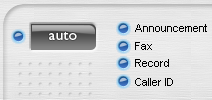
Turn the answering machine on by switching the modem to
auto-answer mode. The behavior of the answering machine
depends on four basic settings that can be switched on-and-off
by clicking on the Announcement, Fax, Record
and Caller ID buttons to the right of the Auto
button on the fax panel.
|
|
These settings can be activated independently of each other, and in
any combination.
Announcement
When Announcement is enabled, after the modem answers an incoming
call a voice message will be played over the line.
Fax
When Fax is enabled, upon detection of fax tones (signals) VentaFax
will attempt to receive a fax.
Record
If Record is enabled, the program will record a voice message.
How the answering machine works
Let's examine a scenario in which all the answering machine settings
are switched on, and at least one of the Recognize telephone line
state for incoming calls settings under the Voice - Recognition
of Signals tab is enabled. In this case the answering machine operation
sequence will be as follows:
After the modem picks up the handset, the auto-answer greeting is played;
the program then switches to a voice recording mode, along with analysis
of the line. The analysis is conducted in order to detect:
- short tones (when the handset on the other end has been
put down);
- transmitting fax tones (signals);
- selection of an extension or of a telephone connected via
the modem. Detection of this is possible if the modem can recognize
one of these situations;
- signals of an answering machine remote control.
Upon detection of fax tones (signals) VentaFax will attempt to receive
the fax (if, of course, if Fax reception is enabled).
If silence is detected on the telephone line, an attempt to receive
a fax will be made, providing no voice message was received before this.
If a voice message has been received, detection of silence will result
in disconnection.
Should an answering machine remote control command be detected, this
command will be executed – if such a command is indicated in the
remote control script, of course.
You can customize your answering software using Caller ID or Distinctive
Ring service.
Using Caller ID to customize your answering machine
Use caller number identification to customize certain auto-answer settings.
For example, personalize your answering machine greeting message, allow
or disable fax reception, or change the maximum message recording time
or the number of beeps in the telephone line.
The Black List and White List
The Black and White Lists are intended for filtering incoming calls
by phone numbers identified. To enable call filtering by the Black List
or White List, select the corresponding setting under the Caller
ID - Calls Filtering tab.
Playing the phone number via a sound device
To play an identified phone number via your computer's sound device,
enable the Voice number via sound device setting under the Caller
ID - Displaying and Voicing tab.
Registering incoming calls without an auto-answer
If you want to be informed of incoming calls received in your absence,
but do not want an answering machine to answer calls, you can choose
from two options.
The first option is to assign a high value for the Answer on, ring
setting under the Reception - Automatic tab. The value must be
high enough for the caller to lose patience and hang up (for example,
99).
Alternatively, disable all answering machine operation modes (Announcement,
Fax, Record, and Caller ID). If your telephony
switch supports Caller ID, you can leave this mode selected to detect
incoming numbers.
In either case such calls will be registered in the Log Book as an
"Unanswered incoming call". The time of call reception and
phone number (with Caller ID mode enabled) will also be registered.
|
|
|
Download the Trial Version of VentaFax
|
See also: Lesson
4. Using the answering machine
|



